A beautiful website is a vanity metric if it doesn’t convert. In today’s digital first economy, website designing isn’t just about choosing the right hex codes; it’s about engineering a user journey that turns curious browsers into loyal clients. While our core website creation guide covers the foundational blueprint of building a site, this post dives into the high-level design nuances that define your brand’s digital authority
What Services Do Website Designers Provide?
A professional web designer doesn’t just “make a website.” They build a conversion engine.
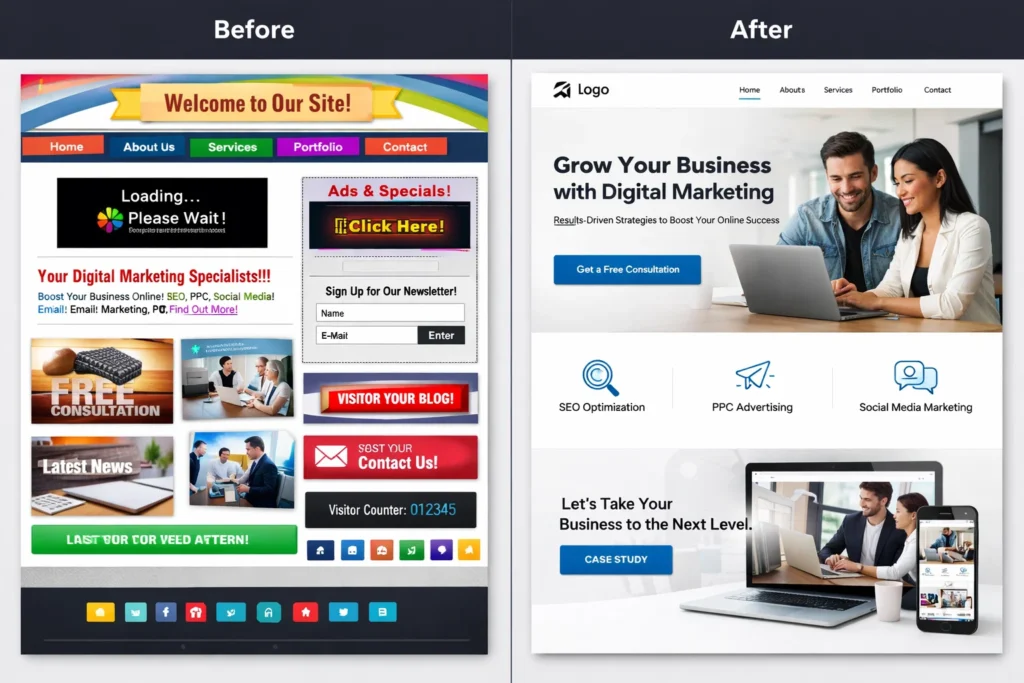
Custom website design (UI/UX)
Before a single pixel is colored, a designer builds the “blueprint.”
- User Interface (UI): Focuses on the visual touchpoints—the buttons, icons, and spacing that make a site look “Pinteresty” and modern.
- User Experience (UX): Focuses on the logic. It maps out how a visitor moves from your homepage to a contact form without friction.
- Wireframing: Creating low-fidelity sketches to ensure the information hierarchy is correct before moving into full production.
Website development (WordPress, Shopify, custom builds)
Depending on your business needs, designers specialize in different ecosystems:
- E-commerce: Building high-converting stores on Shopify or GoDaddy.
- CMS-Based: Creating flexible, scalable sites on WordPress.
- Custom Builds: For unique technical requirements that require bespoke coding.
Responsive & Mobile-first design
With the majority of traffic coming from mobile devices, modern designers build “responsively.” This means your site fluidly adapts its layout whether it’s being viewed on a 27-inch monitor in an office or a 6-inch smartphone on the go.
Search Engine Optimization (SEO) Integration
A quality designer understands that a beautiful site is useless if it’s invisible. And so, Search engine optimisation is very important.
- Site Speed Optimization: Ensuring image sizes and code structures don’t slow down the user.
- Accessibility: Making sure the site is usable for everyone, including those using screen readers.
- Clean Code: Utilizing proper $H1-H6$ tagging and schema markup to help Google understand your content.
Landing Page Design
A great designer doesn’t just build a site; they build high-conversion gateways. Landing page design is a specialized service focused on a single call-to-action (CTA), stripping away distractions to drive lead generation. By utilizing a “Pinteresty,” clean aesthetic combined with psychological triggers, designers create dedicated pages for your ad campaigns or product launches that turn traffic into tangible results.
Website Speed Optimization
In 2026, design and speed are inseparable. Designers provide optimization services that include image compression, lazy loading, and code minification to ensure your site loads in under 2 seconds. This technical layer of website designing is critical for maintaining your SEO rankings and preventing “bounce” from impatient visitors.
Conversion Optimization (CTAs & Funnels)
Beyond looking good, your site must work as a 24/7 salesperson. This service involves the strategic placement of CTAs, heat-mapping user behavior, and designing sales funnels that guide a prospect from awareness to purchase. It’s the “science” of design—using data to determine which button colors, placements, and headlines resonate most with your specific audience.
Website Maintenance & Updates
The digital landscape is constantly shifting, and a “set it and forget it” mentality is a risk to your security. Designers provide ongoing maintenance to ensure your plugins, themes, and security patches are up to date. This ensures that the high-quality website creation you invested in remains functional, secure, and compatible with the latest browser updates and mobile devices.
The 7C’s of Website Design
This model ensures that every design choice serves a specific functional purpose, aligning your visual identity with your business goals.
Context (The “Look and Feel”)
Context is the foundation of website designing. It encompasses the layout, visual hierarchy, and overall structure. A well-designed context ensures that a visitor immediately understands your brand’s “vibe” whether it’s a high-tech service provider or a minimalist apparel boutique and can navigate the site intuitively.
Content (The “Message”)
Content is the substance of your site. It includes the copy, high-resolution imagery, and video assets. In a quality-focused design, content isn’t just “filled in”; it is strategically placed to educate the user and answer their questions as they scroll.
Community (The “Interaction”)
Modern websites often act as hubs for engagement. Community features such as comment sections, member forums, or user-generated reviews help build trust. For small businesses, this element turns a static page into a living ecosystem where potential clients see active social proof.
Customization (The “Personal Touch”)
Customization refers to how the site adapts to individual users. This could range from “Recently Viewed” products in an e-commerce store to personalized greeting messages or language toggles. It shows the user that the experience has been tailored specifically for their needs.
Communication (The “Dialogue”)
How does your site talk to its visitors? This includes contact forms, live chat widgets, and automated email signups. Effective website designing makes these touchpoints frictionless, ensuring that “Communication” is always just one click away.
Connection (The “Ecosystem”)
Your website does not exist in a vacuum. Connection involves how seamlessly your site integrates with external platforms social media feeds, third-party booking tools, or professional networking links. This ensures a cohesive brand experience across the entire web.
Commerce (The “Transaction”)
For many, the ultimate goal of website creation is to facilitate business. Commerce covers the secure handling of payments, shopping carts, and transaction receipts. A design that prioritizes “Commerce” ensures the checkout process is secure, fast, and builds enough trust to finalize the sale.
3 second rule in Website Designing
Research consistently shows that users form an opinion about a website’s credibility and relevance in less than three seconds. If the page is confusing, slow, or cluttered, they will “bounce” back to the search results.
Here is an elaboration on how to technically and creatively apply these four pillars to your site:
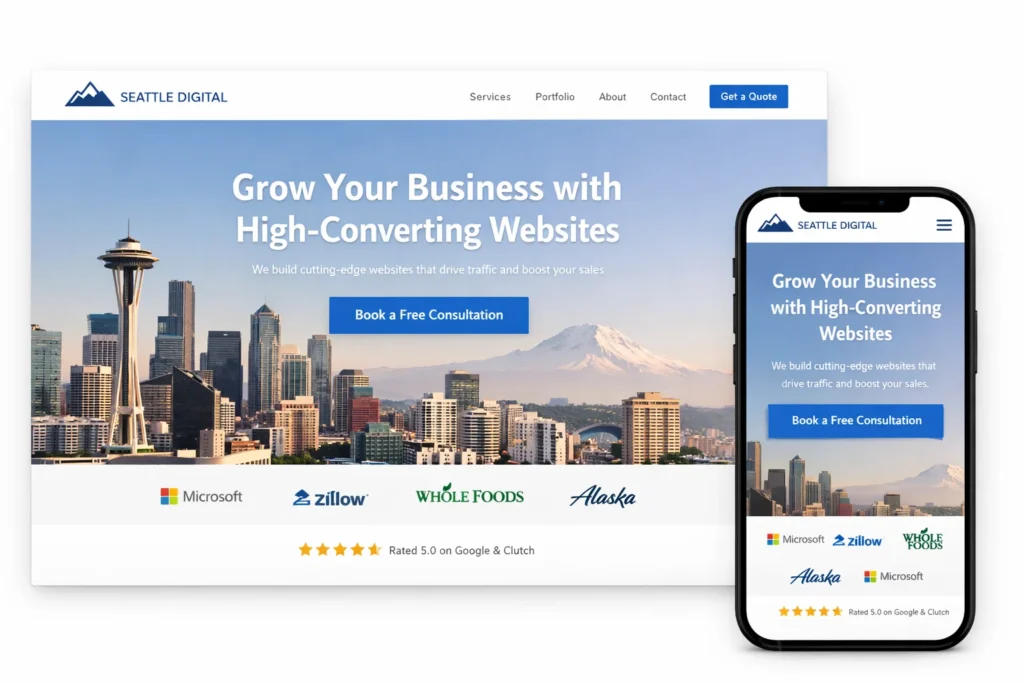
1. Clear Headline “Above the Fold”
The “fold” is the portion of the webpage visible without scrolling. Your <H1> headline must be the first thing a user sees.
- The Goal: Answer the “Who” and “What” immediately.
- Application: Use a high-contrast font and a clean aesthetic to ensure the text is readable over your hero image.
2. Strong CTA (Call to Action)
A user should never have to wonder what to do next. A strong CTA provides a clear path forward.
- The Goal: Answer the “What they should do next.”
- Application: Use high-visibility buttons like “Book a Free Consultation Call” or “View Our Portfolio.” Place at least one primary CTA in the top-right corner of the header and another directly under your main headline. Use a color that pops against your background but stays within your brand’s style guide.
3. Simple Navigation
Cognitive load—the amount of mental effort required to use your site, should be kept to a minimum. If a user has to “think” about where to find your services, you’ve already lost them.
- The Goal: Reduce friction.
- Application: Limit your main menu to 5–7 essential items. Use standard labels like “Services,” “About,” and “Contact” rather than creative synonyms. For mobile users, ensure your “hamburger menu” is large enough to tap easily.
4. Fast Loading Speed
This is the most literal part of the rule. If your site takes 4 seconds to load, the user will never even see your beautiful headline or CTA.
- The Goal: Functional readiness.
- Application: High-quality website designing requires back-end optimization. This involves compressing large images (especially those “Pinteresty” high-res shots), leveraging browser caching, and minimizing heavy scripts. Speed is not just a user preference; it is a core Google ranking factor.
Types of Website
Business Website
A business website acts as a digital headquarters, providing essential information about a company’s services, mission and brand identity. Its primary goal is to establish professional credibility and provide a direct point of contact for potential clients or partners.
E-commerce Website
Designed specifically for transactions, e-commerce sites allow users to browse products, add items to a cart, and securely check out. These platforms require robust backend integration for inventory management, payment gateways, and shipping logistics.
Portfolio Website
A portfolio is a curated visual gallery used by creative professionals like designers, photographers, and architects to showcase their best work. The design focus here is on high-quality imagery and a minimalist aesthetic that lets the work speak for itself.
Blog
Blogs are content-focused sites where articles or “posts” are displayed in reverse chronological order. While they can be standalone, they are often used as cluster content within business sites to build topical authority and improve SEO through regular updates.
Landing Page
A landing page is a single-focus destination designed to drive a specific action, such as signing up for a newsletter or downloading a guide. By stripping away standard navigation, these pages minimize distractions and maximize conversion rates for marketing campaigns.
Educational Website
These platforms provide structured learning materials, online courses, or academic resources to students and professionals. They often feature interactive elements like quizzes, video modules, and progress tracking to facilitate a comprehensive learning experience.
Membership Site
A membership site restricts access to premium content behind a login or “paywall.” These sites are excellent for building exclusive communities, offering subscription-based services, or providing specialized tools to a verified user base.
Non-profit Website
Built for charities and community organizations, these sites focus on awareness, storytelling, and fundraising. They typically feature prominent “Donate” buttons and transparency reports to build trust with potential donors and volunteers.
Educational Website
Focusing on engagement and leisure, entertainment sites host videos, games, or interactive media to keep users on-site as long as possible. These sites often prioritize high-tech visuals and fast-loading media players to ensure a seamless user experience.
News Website
News and media sites are digital newspapers that prioritize high-volume content and real-time updates. The design must accommodate complex information hierarchies, allowing readers to navigate through various categories like politics, tech, and lifestyle easily.
Directory Website
A directory acts as a searchable database for businesses, services, or people, such as a local chamber of commerce or a real estate listing site. These require advanced search and filter functionality to help users find specific information within a large dataset.
Personal Website
Personal websites are used for individual branding, such as a digital resume or a personal hobby site. They offer a space to share personal thoughts, travel logs, or professional achievements in a format that the owner fully controls.
Key Website Design Rules You Must Follow
Design for scanning (F-pattern)
Use whitespace effectively
Follow visual hierarchy
Keep navigation simple
Focus on key elements (80/20 rule)
In the modern digital landscape, website is the digital face of your business. Whether you are building a professional portfolio, a complex e-commerce store, or a high-converting landing page, the goal remains the same: to create a seamless, 3-second-compliant experience that turns visitors into long-term partners.
By applying the 7 C’s framework and prioritizing speed, mobile responsiveness, and strategic CTAs, you ensure that your website isn’t just a static page, but a dynamic growth engine. As we emphasize in our master approach to website creation, the most successful sites are those that balance high-tech functionality with a clean, human-centered aesthetic.
Investing in professional design today means building a scalable foundation for your brand’s future. Don’t settle for a generic template when you can build a digital destination that truly reflects the quality of your work.
FAQ
What Are the 5 Elements of a Good Website Design?
Essential Elements that directly impact user experience:
Strong Visual Hierarchy
Clear Navigation
Fast Loading Speed
Mobile Responsiveness
High-Quality Content
What Is the 3-3-3 Rule in Marketing?
The 3-3-3 rule helps structure messaging:
Next 3 sections → Drive action
First 3 seconds → Grab attention
Next 3 lines → Build interest
What Are the 5 Golden Rules of Web Designing?
1. Clarity Over Creativity
Users should instantly understand your offer.
2. Simplicity Wins
Too many elements = confusion.
3. Mobile-First Design
Most users browse on mobile.
4. Speed Matters
Even a 1-second delay reduces conversions.
5. Strong CTA Placement
Guide users to take action.
What Are 7 types of Design?
In web design context:
Motion design
Visual design
UX (User Experience) design
UI (User Interface) design
Interaction design
Graphic design
Responsive design
RANK HIGHER. GROW FASTER.
Get free SEO E-book
Get 5 battle-tested SEO strategies to dominate search results, drive traffic, and grow your business.